Guide
Switch From Letterboxd: Import Your Films and Ratings (2026)
Looking for a Letterboxd alternative that keeps your history? Shortlist for iPhone reads your Letterboxd export and brings over the films you have watched, your star ratings and your watchlist. Here is how it works, in three steps.
The short answer
Yes. In Shortlist for iPhone, open Settings > Switch from Letterboxd and choose your export.
Your stars pick each film’s starting shelf: Loved, Okay or Not for me. A few head-to-heads then put each shelf in your order. The file stays on your iPhone.
Price: Free · Letterboxd import: iPhone now, Android coming

The Letterboxd import is in the iPhone app now and coming to Android.
Shortlist is a free app that ranks the movies and TV shows you have seen by asking which of two you liked more. Its Switch from Letterboxd import reads the export file you download from your Letterboxd account and turns your star ratings into a starting ranking, so you do not begin from an empty list.
How to Import Letterboxd in 3 Steps
Step 1
Export your data from Letterboxd
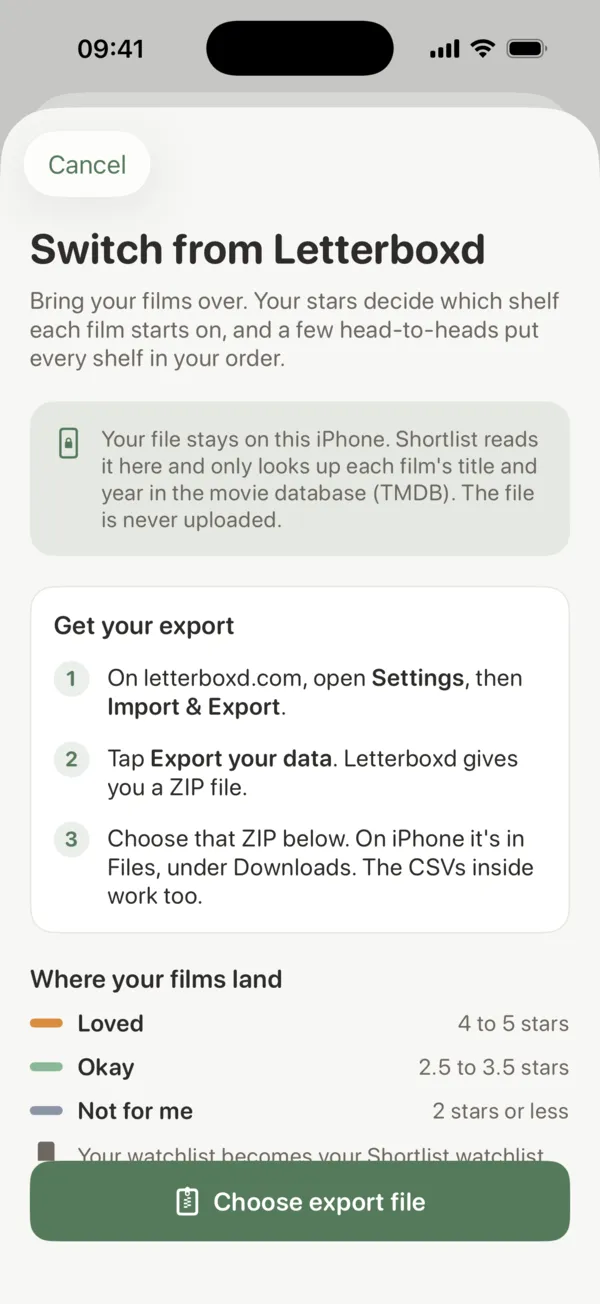
On letterboxd.com, open Settings, then Import & Export, and tap Export your data. Letterboxd gives you a ZIP file. On iPhone it is in the Files app, under Downloads.
Step 2
Choose the ZIP in Shortlist
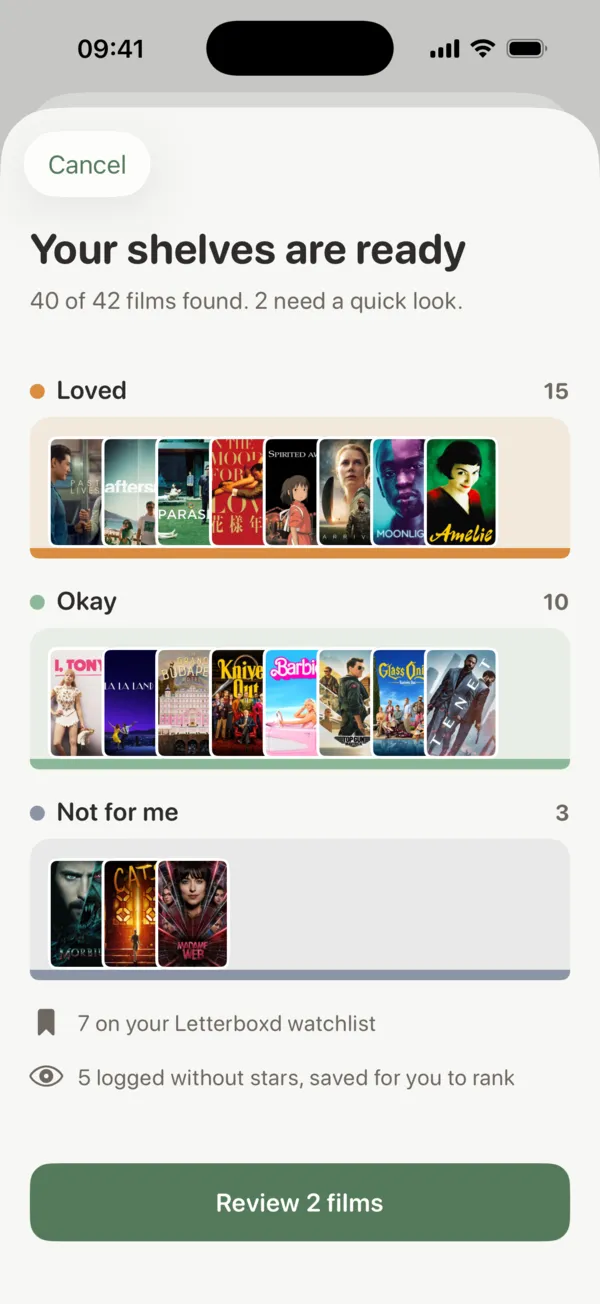
In the Shortlist app, open Settings > Switch from Letterboxd and choose the ZIP. Your stars put each film on a starting shelf: Loved, Okay or Not for me.
Step 3
Put each shelf in your order
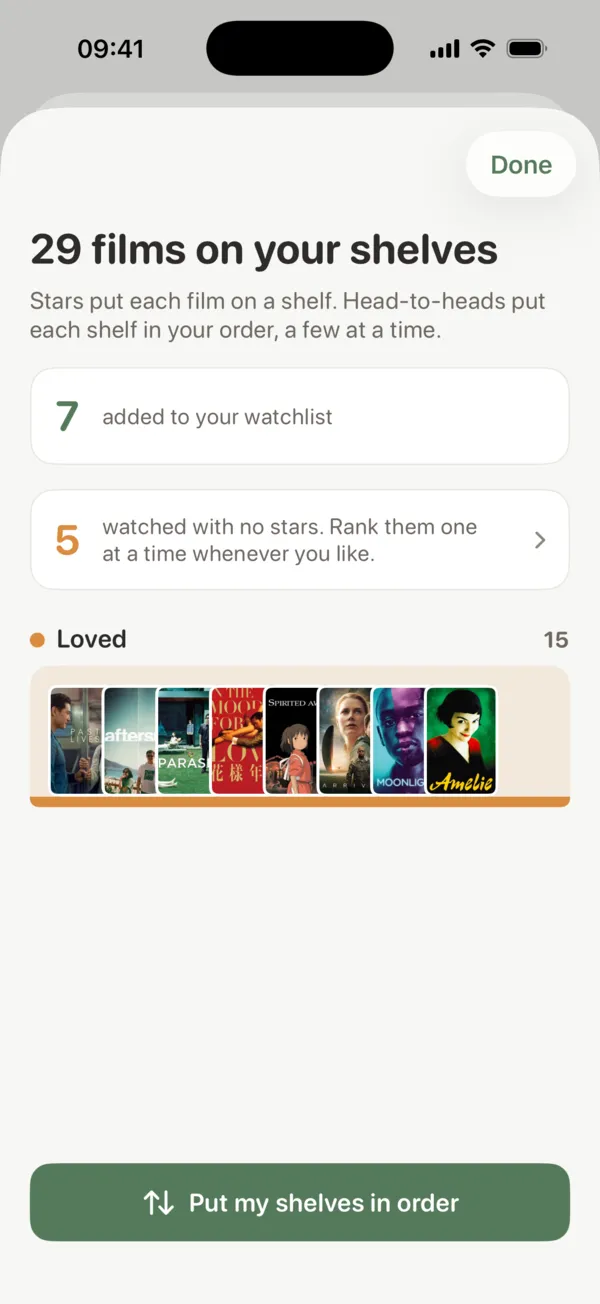
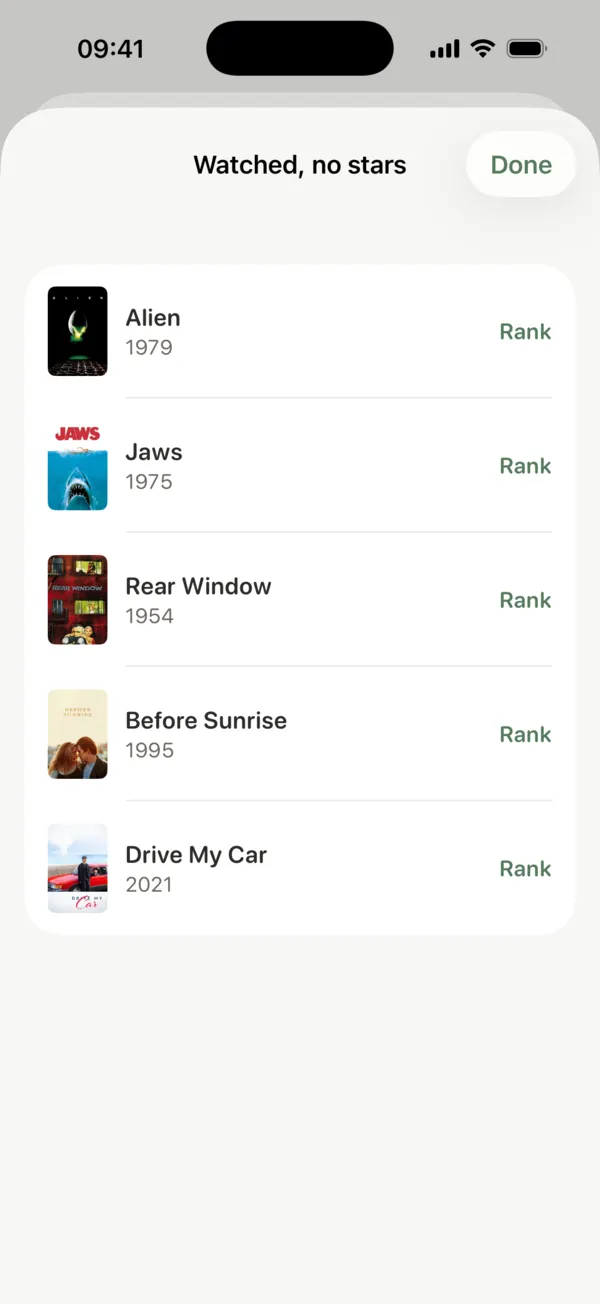
A few head-to-heads put each shelf in your order. Films you logged without stars wait for you to rank them whenever you like.
Where Your Stars Land
Your stars only decide where each film starts. Shortlist keeps three shelves, the same three first reactions you give any film you rank in the app, and every rated film from your export lands on one of them:
- Not for me
- 2 stars or less
- Okay
- 2.5 to 3.5 stars
- Loved
- 4 to 5 stars
Inside a shelf, the order is yours to set. Shortlist asks which of two films you liked more, a few at a time, and each answer moves one above the other. The how scores work guide explains how the 0 to 10 score comes out of those picks.
The Reel
One sharp movie newsletter, every Tuesday
What to watch, what to skip, and where it lands on the rankings. Free, no spam, unsubscribe anytime.
What Comes Over, and What Stays on Your iPhone
| In your export | In Shortlist |
|---|---|
| Star ratings | Each rated film starts on Loved, Okay or Not for me, ready to put in order |
| Films watched without stars | Kept aside for you to rank whenever you like, one at a time |
| Watchlist | Becomes your Shortlist watchlist |
| Reviews, lists and likes | Not imported. They stay on Letterboxd |
| The export file | Stays on your iPhone. Only each film's title and year are looked up |
The file stays on your iPhone. Shortlist reads it on the phone and only looks up each film’s title and year in The Movie Database (TMDB) to find the right film. The file itself is never uploaded, and Shortlist never signs in to your Letterboxd account.
Bring your Letterboxd history over
Shortlist is free. Find the import in Settings.
The Letterboxd import is in the iPhone app now and coming to Android.
Why Rank Instead of Rate?
A star rating says how much you liked a film. It cannot say which of two four-star films you liked more, and after a few hundred films most of the ones you liked share the same few stars. Shortlist starts from your stars and then asks the one question they leave open: which of these two was better?
Plenty of people keep logging and reviewing on Letterboxd and use Shortlist for the ranking. The import reads a copy of your data, so doing both works fine.
More Ways to Rank What You Watch
- Letterboxd Alternatives: other apps for logging and ranking what you watch
- Best Movie Ranking Apps: how the ranking apps compare
- Movie Rating App Without Stars: rate films two at a time
- Movie Tier List: sort what you have seen, S through D
Switch From Letterboxd FAQ
Can I import my Letterboxd ratings into Shortlist?
Yes, in the Shortlist app for iPhone. Open Settings > Switch from Letterboxd and choose the export file from your Letterboxd account. It brings over the films you have watched, your star ratings and your watchlist. Your stars pick each film's starting shelf (Loved, Okay or Not for me), and a few head-to-heads then put each shelf in your order.
How do I export my data from Letterboxd?
On letterboxd.com, open Settings, then Import & Export, and tap Export your data. Letterboxd gives you a ZIP file. On iPhone it is in the Files app, under Downloads, and Shortlist reads that ZIP as it is. The CSV files inside it work too.
How do my Letterboxd stars turn into a ranking?
Your stars decide where each film starts. Films you rated 4 to 5 stars start on Loved, 2.5 to 3.5 stars on Okay, and 2 stars or less on Not for me. A few head-to-heads then put the films on each shelf in your order.
What happens to films I logged without a star rating?
They wait for you. Shortlist never invents a rating, so films you logged as watched without stars are kept aside for you to rank whenever you like, one at a time.
Is my Letterboxd export uploaded anywhere?
No. The file stays on your iPhone and Shortlist reads it there. The only thing it looks up is each film's title and year, in The Movie Database (TMDB), to find the right film. The file itself is never uploaded.
Does it bring over my Letterboxd reviews and lists?
No. The import reads the films you have watched, your star ratings and your watchlist. Reviews, lists and likes are not imported, and Shortlist never signs in to Letterboxd, so nothing on your Letterboxd account changes.
Can I import Letterboxd on Android?
Not yet. Switch from Letterboxd is in the Shortlist iPhone app now and is coming to the Android app. Shortlist itself is already free on Google Play.
Shortlist is not affiliated with Letterboxd. Letterboxd is a trademark of its owner, named here only to describe the export file the import reads.
The Reel
One sharp movie newsletter, every Tuesday
What to watch, what to skip, and where it lands on the rankings. Free, no spam, unsubscribe anytime.
Your Letterboxd history, in order
Shortlist is free. Import your films, then tap the better of two and your ranking builds itself.
The Letterboxd import is in the iPhone app now and coming to Android.